
Batery Bet India Payments and Banking Options
Batery Bet cover the available methods for funding accounts and requesting withdrawals. Indian users may find options such as UPI, Paytm, PhonePe, online banking and selected cryptocurrencies, depending on current availability. Minimum transaction amounts, processing times and limits vary by payment method. Review the cashier details, compare the available options and check the applicable conditions before making a transaction.
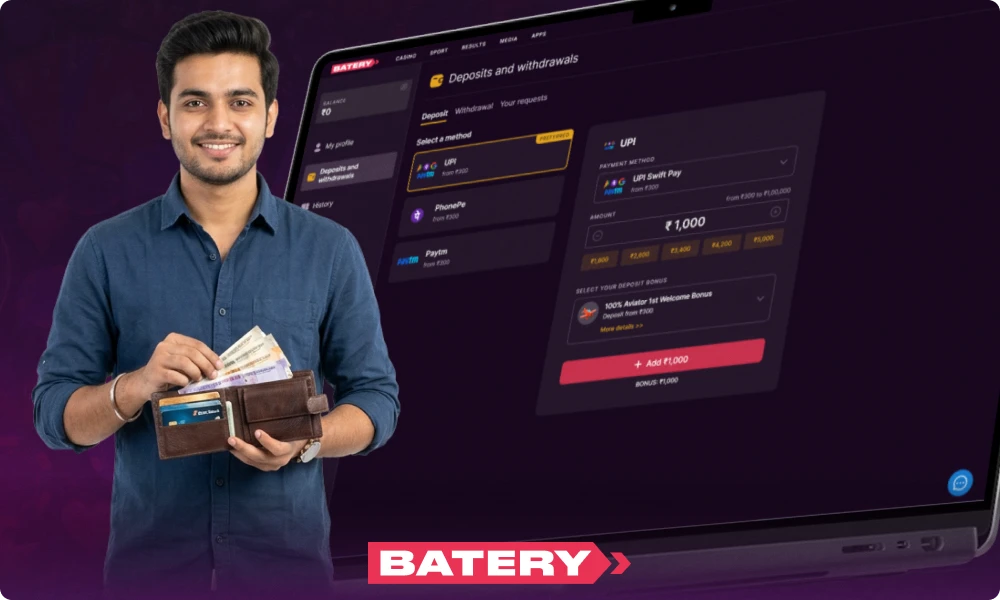
Batery Bet India Cashier – Supported Payment Methods
In this section, users can access payment methods commonly used in India. The Batery cashier handles both deposits and withdrawals in rupees.
UPI Transfers and Indian Digital Payment Services
In India, users can access seven UPI-based transfer options at the Baterybet cashier. Each option has its own threshold and processing speed. Users must log in to view available options, see current availability for each transfer method, and view specific figures for each method.
| Method | Min Amount | Max Amount | Processing |
|---|---|---|---|
| Standard UPI | ₹300 | ₹100,000 | Instant |
| UPI FAST | ₹300 | ₹200,000 | Instant |
| UPI VIP | ₹500 | ₹500,000 | Instant |
| UPI Auto | ₹1,000 | ₹300,000 | Instant |
| UPI P2P | ₹500 | ₹250,000 | Instant |
| PhonePe P2P | ₹300 | ₹200,000 | Instant |
| Google Pay | ₹300 | ₹150,000 | Instant |
Paytm, PhonePe and Mobile Wallets
After logging in, users can view the available amounts. The cashier displays the payment methods. Indian users can select from Paytm, PhonePe, or certain mobile wallets. Each payment method allows users to deposit funds, and withdrawal options depend on the payment method chosen at checkout.
| Method | Use | Typical min–max deposit | Indicative processing time |
|---|---|---|---|
| Paytm | Deposit / Withdraw | ₹300 – ₹100,000 | Instant |
| PhonePe | Deposit / Withdraw | ₹300 – ₹500,000 | Instant |
| Google Pay | Deposit | ₹300 – ₹100,000 | Instant |
Bank Transfers and Alternative Payment Options
IMPS, AstroPay, and iCash One address deposit needs in India. People rely on these options to transfer funds from their bank accounts. They become useful when UPI or e-wallets face restrictions or limits.
- IMPS: direct bank transfer suited for larger transactions outside UPI caps;
- AstroPay: a prepaid voucher option for users without direct bank access;
- iCash One: a cash-based alternative for Batery Bet deposits at select outlets;
- Limits and availability for each method appear inside the cashier at the time of use.
Cryptocurrency Deposits and Payouts
Indian users see cryptocurrency options after logging in. The Baterybet cashier displays a list of 12 digital currencies, each showing its current available balance. When a transaction is made, the cashier provides the amount in INR at that moment. Transfer speeds may differ, as blockchain confirmation times are not constant. The network determines when funds are credited to the account.
| Cryptocurrency | Typical Min Deposit | Network-Dependent Speed |
|---|---|---|
| Bitcoin | ₹500 | Slow |
| Tether | ₹300 | Fast |
| Ethereum | ₹2,000 | Moderate |
| Litecoin | ₹500 | Fast |
| TRON | ₹500 | Very fast |
| Ripple | ₹500 | Very fast |
| Dogecoin | ₹500 | Moderate |
| Bitcoin Cash | ₹500 | Fast |
| Cardano | ₹500 | Moderate |
| Binance Pay | ₹500 | Fast |
| USD Coin | ₹300 | Fast |
| Solana | ₹300 | Very fast |
Funding a Batery Bet Account – Deposit Instructions
Begin by creating an account. Next, add funds to your balance. In the cashier section, select a payment method that supports INR. If the site requires it, deposit ₹300.
Accessing the Cashier and Choosing a Payment Option
After users log in, they open the cashier in Battery.
- Log in. Open the Batery account with registered credentials;
- Open the cashier. Select the cashier section from the desktop menu or the app navigation bar;
- Select Deposit. Tap or click the "Deposit" button inside the cashier;
- Pick a method. Choose UPI, a wallet like Paytm or PhonePe, a bank transfer, or a cryptocurrency option;
- Enter details. Type the deposit amount and fill in the required payment information.
Entering Deposit Details and Selecting an Amount
The cashier shows the minimum and maximum amounts for each payment method. Players check these numbers before moving to the next step.
- Enter an amount within the displayed method limits;
- Provide a UPI ID or digital wallet details for Indian payment options;
- Supply a crypto address or payment reference for cryptocurrency transactions;
- Confirm the figures shown match the selected method's thresholds.
Confirming a Transaction and Checking the Balance
The user submits a deposit and completes the credit verification steps. The app reviews and approves each stage. Pending status may occur, and the user may need to revisit the account to address the pending status.
- Approving in the app. Open the UPI, wallet, or crypto app and approve the transaction request;
- Returning to Batery bet. Go back to the account cashier and check the balance;
- Verifying the credit. Look for an instant or 5-minute credit in the transaction history;
- Checking a pending deposit. Locate the transaction reference number and note the payment method used;
- Contacting support. Send the reference, amount, and date to [email protected].
Batery Bet Withdrawal Options and Payout Processing
Batery Bet processes withdrawals in India in INR. The payout method must match the last deposit method used. Withdrawal requests complete in up to 72 hours.
Submitting a Cashout Request
Visit the cashier section at Baterybet to start a withdrawal. Complete each step as prompted. Review your details before submitting your request. Before releasing your funds, Baterybet's team will require you to pass an identity check.
- Logging in. Open the account and enter valid credentials;
- Accessing the cashier. Go to the payment section inside the account;
- Opening withdrawals. Select the withdrawal tab within the cashier;
- Entering the amount. Type a figure within the ₹300–₹100,000 limit;
- Confirming the request. Submit the form to send the payout request.
Selecting a Suitable Withdrawal Method
Each method serves a different need.
- UPI: Fast rupee payouts with a ₹300 minimum and up to ₹30,000 maximum per transaction;
- Paytm/PhonePe: Minimums from ₹300–₹500, maximums reach ₹100,000, suited to mid-range amounts;
- Bank transfer: Accepts larger sums but takes longer to process;
- Only methods used for the deposit appear as eligible withdrawal options in Batery bet India.
Payment Verification and Withdrawal Approval
Players are required to verify their accounts, and the account name must match the payment details. Before withdrawing funds, each player must fulfill all bonus turnover requirements. Staff review every payout request and conduct several checks, which may take longer when a withdrawal is requested. This process can delay the payout. Withdrawals are processed through UPI, Paytm, or PhonePe, usually within about 15 minutes, though in some cases this may take up to 72 hours.
Tracking Pending and Completed Payouts
The cashier section displays the current statuses of withdrawals. Users can view these updates in their transaction history.
- Cashier location. Open the account cashier and select the transaction history tab;
- Pending status: the request is in queue for review;
- Approved status: the payout passed review and Batery Bet processes it;
- Paid status: funds left the account successfully;
- Failed status: the payout failed review and requires resubmission;
- Contact live chat for a UPI or bank transfer exceeding 72 hours without a status update.
Batery Bet Banking Conditions – Limits, Fees and Transaction Security
Deposit and withdrawal limits at Batery Bet vary according to the chosen payment method. UPI, e-wallets, and cryptocurrencies each have their own processing times. Users who have not completed KYC verification are not able to withdraw funds.
Minimum and Maximum Deposit Requirements
After logging in, users can view the limits for each payment method. Limits may differ based on the account. In India, each deposit method group displays established ranges when users access their accounts.
| Method group | Common minimum | Typical maximum |
|---|---|---|
| UPI variants | ₹300 | ₹100,000 |
| Paytm | ₹300 | ₹100,000 |
| PhonePe | ₹300 | ₹500,000 |
| IMPS | ₹1,000 | ₹100,000 |
| AstroPay | ₹800 | ₹400,000 |
| Bitcoin | ₹500 | ₹500,000 |
| Ethereum | ₹2,000 | ₹500,000 |
| Tether | ₹300 | ₹500,000 |
Withdrawal Limits and Processing Times
Baterybet shows withdrawal details for every payment method.
- Minimum withdrawal starts at ₹300–₹500 across all listed methods;
- UPI payouts carry a maximum of ₹30,000;
- Wallet methods like PhonePe and Paytm reach up to ₹100,000;
- Crypto withdrawals go up to ₹500,000 per request;
- UPI and wallet payouts take up to 72 hours;
- Crypto transactions complete within 15–60 minutes.
Currency Conversion and Possible Transaction Charges
Batery bet India assigns INR as the default currency for all accounts. If a user deposits or withdraws cryptocurrency, or uses a wallet with another currency, the site converts the funds to INR. This conversion sets the actual amount credited or debited. Batery does not charge extra fees on deposits or withdrawals. Users must review the fees displayed in the cashier before confirming any transaction.
KYC Checks and Financial Information Protection
To proceed, users must satisfy three core requirements. For larger withdrawals, Batery requires identity checks to protect account funds and prevent unauthorized access.
- Name match: the account name must match the registered bank or UPI details;
- Document upload: submit a valid ID and address proof for high-value withdrawals;
- Account ownership: all payment details must belong to the account holder directly.
Frequently Asked Questions
Why Does a UPI Deposit Stay Pending After Money Leaves the Account?
A Batery Bet transaction may remain pending due to provider delays, network congestion, or ongoing confirmation. Wait five minutes; if it does not clear, contact support with your transaction details.
Can a Player Change Withdrawal Details After Submitting a Request?
When a user submits a withdrawal request, Batery Bet locks the details of the request. To make changes, the user must cancel the request in the cashier and then submit a new request. If cancellation is unavailable, the user should contact support.
Why Does a Payment Method Disappear from the Cashier?
Baterybet may disable or hide a method if verification fails. Staff may also set regional limits. If a method does not appear, users can reload the page. They can check both the app and desktop versions. If the option is still not visible, users should contact support.
What to Do With a Completed Withdrawal Not Arriving in the Bank Account?
First, check your cashier status and review your bank or UPI statement for updates, noting the provider's specified timeframe. Wait 72 hours; if funds remain missing, contact Batery bet India support with the reference ID, transaction amount, and date.